Product Bundles
|
New to Sentinel EMS?
|
What Is a Product Bundle?
A product bundle is a catalog entity in Sentinel EMS that groups multiple products—including software, hardware, and services—into a single offering. Product bundles let you control how product quantities, entitlements, and activations are handled. Depending on the product bundle type, you can apply these settings to all products together or manage them individually for each product.
Benefits of Product Bundles:
>Reduces the need for custom configurations when creating bundled offerings or modeling SaaS plans.
>Enables new monetization opportunities by allowing flexible packaging across the product portfolio.
>Provides a simpler and more flexible way to bundle products, making it easier for vendors to scale their offerings.
Types of Product Bundles
| Attribute | Packaged Product Bundle | Discrete Product Bundle |
|---|---|---|
| Overview | A packaged product bundle groups products that are always handled together. All products in the bundle are activated at the same time and behave as a single offering. | A discrete product bundle groups products for convenience while keeping them separate. Each product in the bundle can be activated and managed independently. |
| Key Features |
>All products must have the same quantity. >All products must use the same enforcement. Exception: Sentinel LDK products and Services products can be included in the same product bundle. |
>Products can have different quantities. >Products can have different enforcements. >You can configure specific products to use a fixed quantity instead of being multiplied by the product bundle quantity. |
| Activation |
>You can use the following activation methods to activate a product bundle: •Fixed •Full >All products are activated as a single unit. If the activation fails for any product in a packaged product bundle, the activation for the entire product bundle fails. For details, see Activation Method. |
For each product in the product bundle, activation method is defined in the product itself. Products can be activated individually. For details, see Activation Method. |
| Revocation | You can partially revoke a product bundle by revoking one or more products in the bundle. However, you must revoke all products in the bundle before the product bundle can be reactivated. | Each product can be revoked independently, without affecting the other products in the bundle. |
| Typical Use Cases |
>Commercial offerings where multiple products are always sold and activated together as a single unit. For example, a base application and its mandatory add-ons that must be activated at the same time. >Promotional offerings where products are grouped together and must be activated as a single unit. For example, a limited-time promotion that includes a core product and a bundled service entitlement. |
>Commercial offerings where products are sold together but activated independently, allowing flexibility in how and when each product is used. For example, a base product with optional add-ons that can be activated later. >Offerings that allow customers to choose which products to activate and when to activate them. For example, purchasing a bundle that includes multiple features but activating them independently over time. |
Prerequisites for Creating a Product Bundle
>A role that includes Catalog (Namespace) permissions for the relevant namespace.
>You must define the license model for all features in a product before adding it to a product bundle. You cannot add a product if any of its features have the license model set to Define in Entitlement.
>You cannot add versionless products to a product bundle. However, you can add variants of versionless products.
>You cannot add disabled products,
>
 A product bundle containing products from the Sentinel Fit enforcement cannot contain products from other enforcements.
Product Bundle Status
The Status attribute on the Product Bundles page indicates the status of a product bundle.
Possible values:
>Draft: When you first create a product bundle, it is saved as draft. You can edit or delete a draft product bundle. You cannot create entitlements for a draft product bundle, however, you can create test entitlements for testing purposes.
>Completed: You can create entitlements for the product bundle. You can convert a completed product bundle to draft to edit the product bundle using Revert to Draft.
>End of Life (EOL): An obsolete product bundle. You cannot edit or delete the product bundle, and it is no longer available for inclusion in new entitlements. You can restore an EOL product bundle by marking it as complete.
Creating a Product Bundle
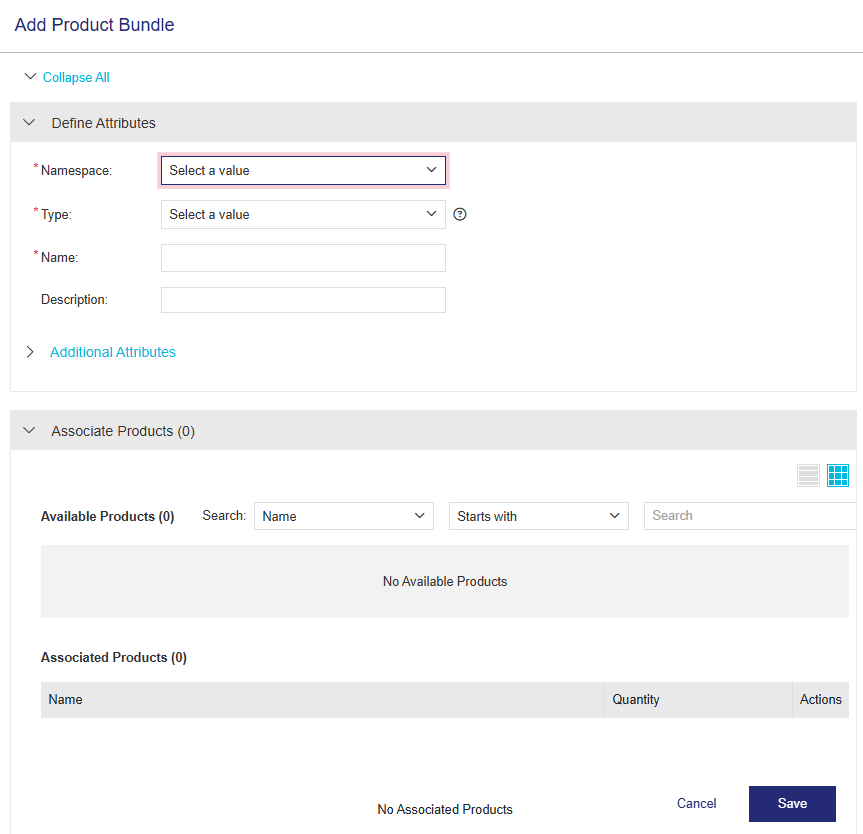
From the navigation pane, select Catalog > Product Bundles to open the Product Bundles page. Then click the Add Product Bundle button to create a product bundle.
Product Bundle Attributes
The following table explains the product bundle attributes:
| Attribute | Description | Required/Optional | Valid Values | |
|---|---|---|---|---|
| Namespace |
(Visible only if more than one namespace is available.) The namespace in which the product bundle is stored. |
Required |
Any namespace in the list |
|
| Type |
Type of product bundle. The following types are available: •Packaged •Discrete For details, see Types of Product Bundles |
Required |
One of the following: >Packaged >Discrete |
|
| Name | Name of the product bundle. | Required |
>1 to 90 characters >Alphanumeric >Special characters >
|
|
| Version | Version of the product bundle. | Optional |
>1 to 80 characters >Alphanumeric >Special characters >
|
|
| Activation Method |
(Available only if Type is set to Packaged) The method of defining and allocating the quantity of licenses available for the product bundle in an entitlement. Activation methods: >Fixed: The total quantity is divided equally for consumption in multiple activations. When you select Fixed, the Fixed Quantity field is added to the Define Attributes pane enabling you to specify the fixed amount to be consumed in each activation. >Full: The entire quantity is activated in a single activation. |
Required |
One of the following: >Fixed >Full Default: Fixed |
|
| Fixed Quantity |
(Available only if Type is set to Packaged and Activation Method is set to Fixed) Defines the fixed amount to be consumed in each activation. NOTE
|
Required |
Number from 1 to the maximum quantity of activations. Must be same as the quantity of the individual products in the product bundle. Default: 1 |
|
| Description | Additional information about the product bundle. | Optional |
>Maximum: 500 characters |
|
|
Additional Attributes |
||||
| External ID | External reference identifier that uniquely identifies the product bundle in an external system. | Optional |
>0 to 60 characters >Alphanumeric >Must be unique |
|
| Ref ID 1 | Reference identifier that identifies the product bundle in an external system. | Optional |
>0 to 100 characters >Alphanumeric |
|
| Ref ID 2 | Reference identifier that identifies the product bundle in an external system. | Optional |
>0 to 100 characters >Alphanumeric |
|
 The fixed quantity of a product bundle that includes products from Sentinel LDK is 1.
Associate Products
After you provide the attribute details, use the Associate Products pane to add products to the product bundle. You can either associate products or create an empty product bundle and add products later.
You cannot associate products that are disabled, versionless, product suites, or other product bundles. You must also define the license model for all the features of the product to be included in the product bundle. Products that contain features with the license model set to Define in Entitlement cannot be added to a product bundle.
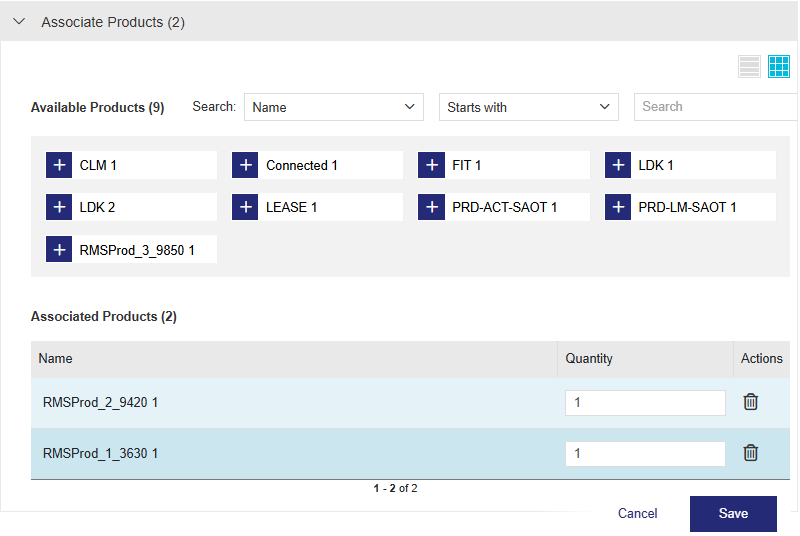
The following attributes are displayed for each product in the product bundle:
| Attribute | Description | Required/Optional | Valid Values | |
|---|---|---|---|---|
| Name | Name and version of the product. | Required |
Read-Only |
|
|
Quantity |
Quantity of the product in the product bundle. For a packaged product bundle, all products must have the same quantity. |
Required |
1 to 99999 Default: 1 |
|
| Product Bundle Quantity Multiplier |
(Available only if Type is set to Discrete.) Specifies whether the product bundle quantity is applied to the product quantity. By default, this option is set to Yes. When set to Yes, the product quantity is multiplied by the product bundle quantity in the entitlement. When set to No, the product quantity is not multiplied by the product bundle quantity and remains fixed at the quantity defined in the product bundle. You cannot split or transfer entitlements containing this product bundle. |
Required |
Yes OR No Default: Yes |
|
| Actions > Delete |
Delete the product from the product bundle. |
Optional |
N/A |
Actions for Product Bundles
The following table lists the actions available for product bundles: